Automated Bank Statement Import into QuickBooks



Automatically extract transactions from bank statement PDFs and post them into QuickBooks as Sales Receipts or Expenses with zero manual entry.
Main use cases:
- Automatically import bank statement transactions into QuickBooks.
- Eliminate manual data entry for monthly bank reconciliations.
- Accurately record both income (credits) and expenses (debits).
- Handle password-protected bank statement PDFs securely.
- Save significant accounting and bookkeeping time.
How it Works:
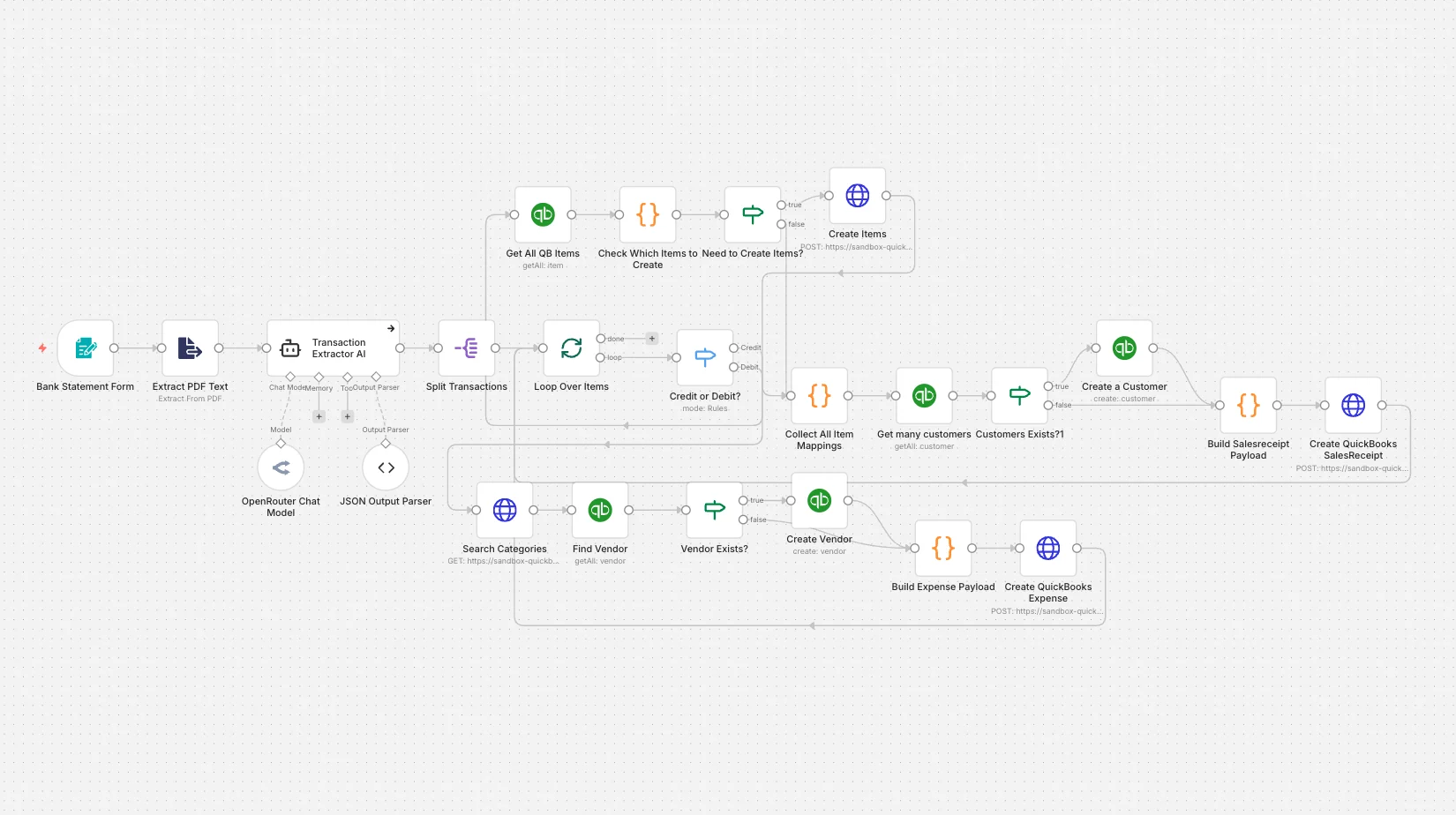
This workflow automates the complete process of converting bank statement PDFs into structured accounting entries in QuickBooks using AI and n8n.
1. Bank Statement Upload
- A user uploads a bank statement PDF (including password-protected files) via a secure n8n web form.
- The workflow supports statements from multiple banks and formats.
2. PDF Decryption & Text Extraction
- The uploaded PDF is decrypted (if required).
- All transaction text is extracted from the statement accurately.
3. AI Transaction Extraction
- An AI agent analyzes the extracted text and converts it into structured transaction data.
- For each transaction, the workflow identifies:
- Credit or Debit
- Transaction date
- Amount
- Description
- Reference number
- Payee or counterparty
4. Strict Data Validation
- AI output is validated against a predefined JSON schema.
- This ensures clean, consistent, and error-free transaction data.
5. Transaction Processing Loop
- Each transaction is processed individually for accuracy and control.
- The workflow intelligently routes transactions based on type:
- Credits → Sales Receipts
- Debits → Expenses
6. Smart QuickBooks Mapping
- Automatically checks and creates missing:
- Customers
- Vendors
- Items
- Expense categories
- Prevents duplicate records and maintains clean accounting data.
7. Automated QuickBooks Posting
- Credit transactions are posted as Sales Receipts.
- Debit transactions are posted as Expenses.
- All entries are synced directly into QuickBooks in real time.
Benefits:
- ✅ Zero manual bank entry
- ✅ Accurate and consistent QuickBooks records
- ✅ Works with password-protected PDFs
- ✅ Handles both income and expenses automatically
- ✅ Saves hours of accounting work every month
Automate Your Accounting with AI:
Take your finance automation further with our AI Automation Services, where we build intelligent workflows for accounting, finance, and operations. You can also explore our n8n Workflow Automation Services to automate QuickBooks, invoicing, reconciliations, and financial reporting with scalable, no-code solutions.