Housekeeping Auto Task Assignment with Smart Staff Allocation



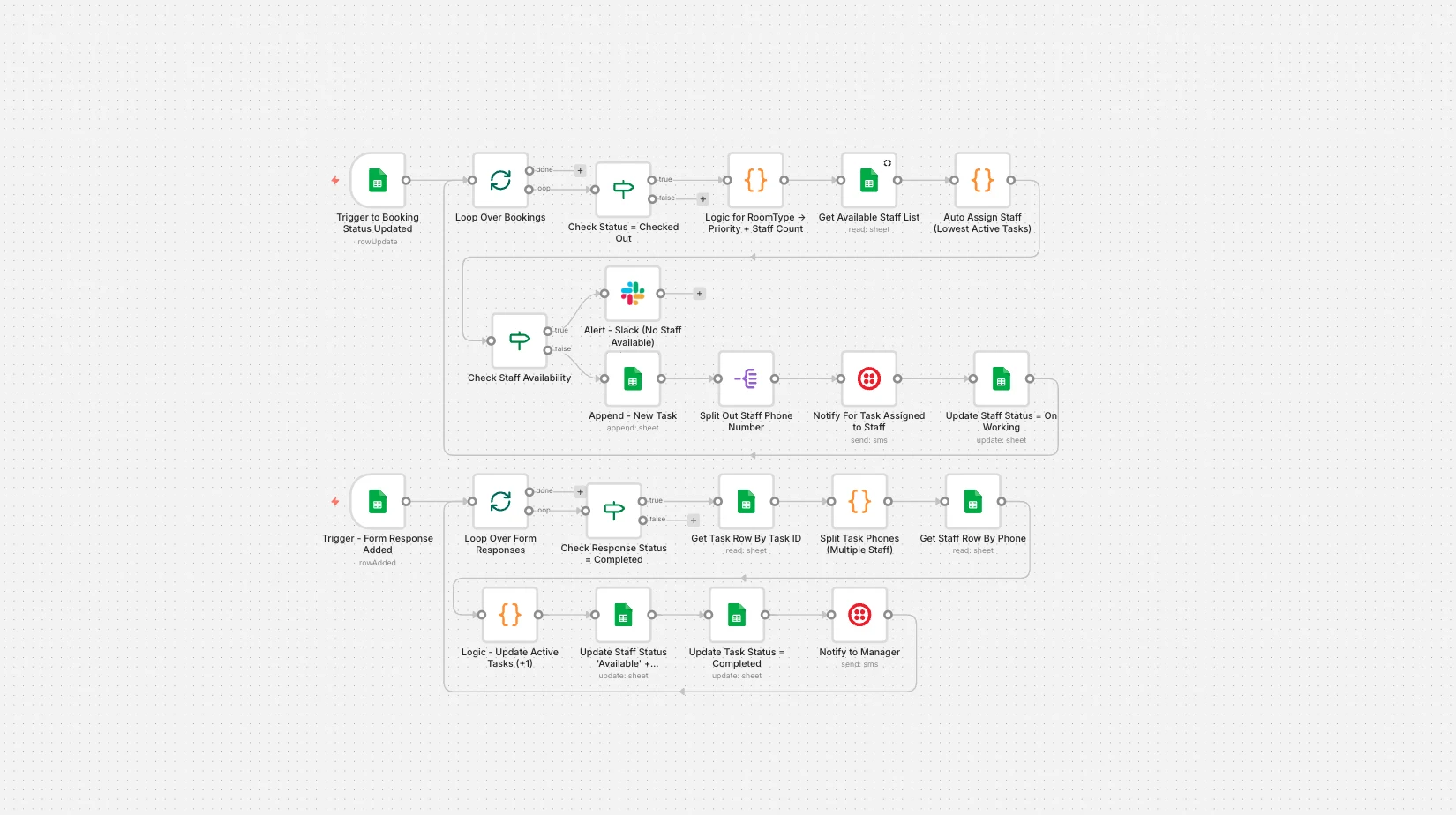
Automatically assign housekeeping tasks when a guest checks out. Smart staff allocation based on availability and workload, with WhatsApp alerts and real-time tracking using Google Sheets.
Main use cases:
- Automatically create housekeeping tasks when a guest checks out.
- Smart staff assignment based on availability and active task count.
- Send real-time WhatsApp alerts to assigned housekeeping staff.
- Notify managers if insufficient staff are available.
- Track task progress and completion using Google Sheets and Google Forms.
- Automatically update staff workload and availability after task completion.
How it Works:
This workflow automates end-to-end housekeeping task management - from checkout detection to staff assignment, task tracking, and completion confirmation.
1. Booking Status Trigger (Checkout Detection)
- The workflow monitors a Google Sheets Bookings sheet.
- When the Status column changes to Checked Out, the automation is triggered.
- Each updated booking is processed individually.
2. Room-Based Cleaning Logic
- The system reads:
- Room Type
- Manager-set Priority
- Cleaning time is automatically calculated based on room type (Standard, Deluxe, Suite).
- Required staff count is determined based on priority:
- Normal → 1 staff
- High → 2 staff
- Urgent → 3 staff
3. Smart Staff Availability Check
- The workflow fetches staff from the Staff sheet.
- Filters:
- Status = Available
- Active = Yes
- Staff are sorted by lowest active tasks to ensure fair workload distribution.
If insufficient staff are available:
- A Slack alert is sent to the manager.
- The task is not created until manual intervention.
4. Automatic Task Creation
- When staff are available:
- A unique housekeeping Task ID is generated.
- Task details are appended to the Tasks sheet.
- Task includes:
- Booking ID
- Room No
- Room Type
- Cleaning Minutes
- Priority
- Assigned Staff
- Created Timestamp
- Status = In Progress
5. WhatsApp Notification to Staff
- Each assigned staff member receives a WhatsApp message via Twilio.
- Message includes:
- Task ID
- Room number
- Priority
- Google Form link for completion submission
- Staff status is automatically updated to On Working.
6. Task Completion Tracking (Google Form)
- After cleaning, staff submit a Google Form.
- When a response with Status = Completed is received:
- The corresponding task is located using Task ID.
- Task status is updated to Completed.
- Completion timestamp is recorded.
7. Automatic Staff Reset & Workload Update
- Staff members assigned to the task are identified.
- Their:
- Active Tasks count is updated.
- Status is changed back to Available.
- This keeps workload tracking accurate for future assignments.
8. Manager Notification
- Once cleaning is completed:
- A WhatsApp message is sent to the manager.
- The room is marked ready for the next guest.
Supercharge Your Hospitality Automation:
Take your hotel or property management operations to the next level by combining this workflow with our AI Agent Development Services to build smart operational assistants. You can also explore our n8n Workflow Automation Services to integrate booking systems, PMS software, CRMs, and communication tools into one seamless automation pipeline.