Student Attendance Monitoring with WhatsApp Alerts



Automate daily student attendance tracking and send instant WhatsApp alerts to parents when a student is absent. Built with Google Sheets, Google Forms, and Twilio.
Main Use Cases:
- Automatically track daily student attendance using Google Forms and Google Sheets.
- Instantly notify parents via WhatsApp when a student is marked absent.
- Maintain a centralized attendance log with notification status.
- Reduce manual follow-ups by teachers with real-time alerts.
- Enable schools to run a fully automated, reliable attendance system.
How It Works:
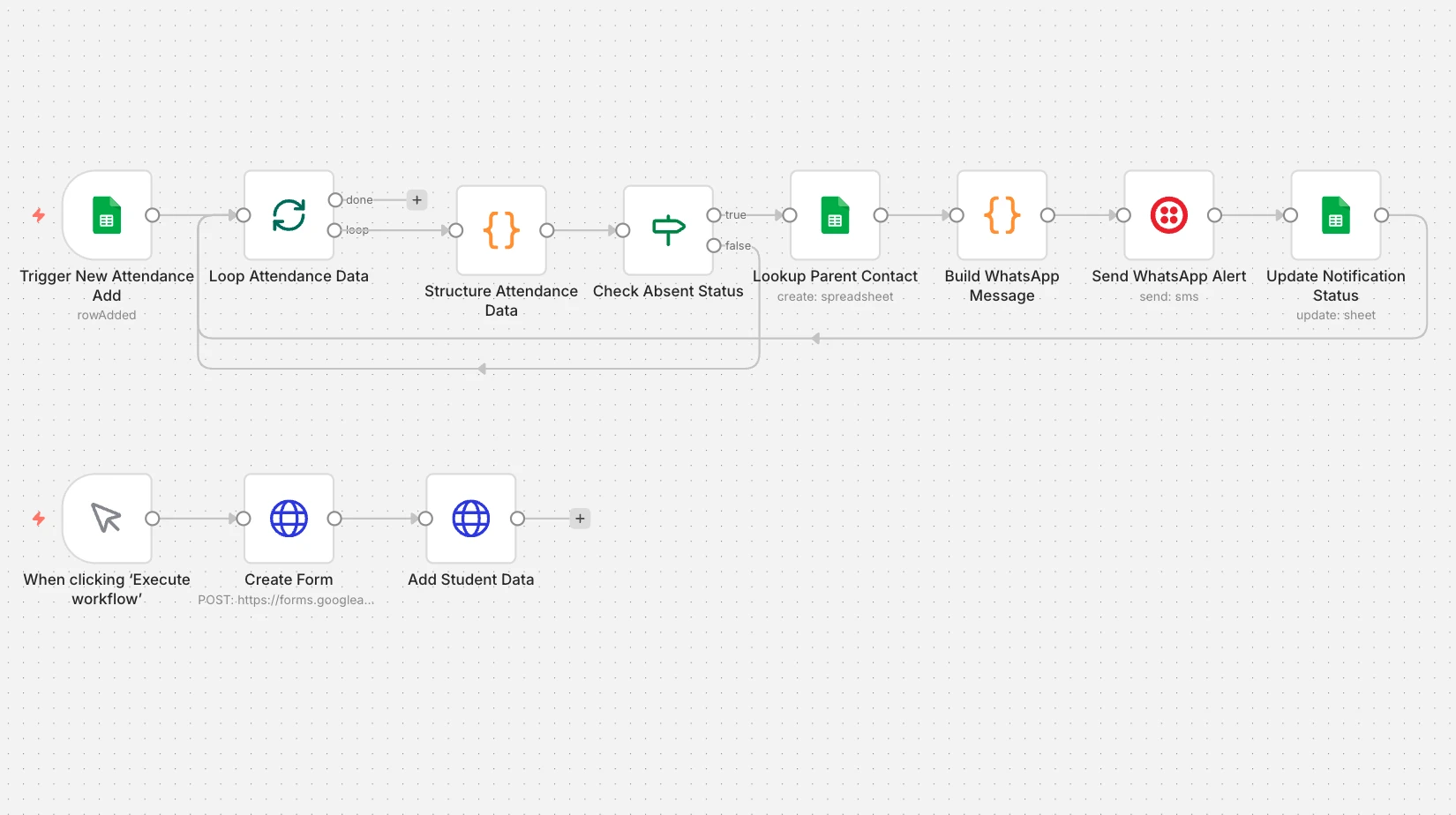
This workflow automates student attendance tracking and sends instant WhatsApp alerts to parents whenever a student is absent, ensuring transparency and faster communication between schools and families.
1. Attendance Trigger (Google Sheets)
- The workflow starts when a new attendance entry is added to the Google Sheet.
- Attendance data is usually submitted via a connected Google Form.
2. Structure Attendance Data
- The workflow:
- Reads the attendance date, class, and teacher name
- Splits attendance data for each roll number
- Converts each student entry into a structured record
3. Absent Student Detection
- Each student’s attendance status is checked.
- Only students marked as Absent move forward in the workflow.
- Present students are skipped automatically.
4. Parent Contact Lookup
- For every absent student:
- The workflow looks up parent details from the Students sheet
- Retrieves parent name and WhatsApp number accurately
5. WhatsApp Alert Message
- A personalized WhatsApp message is generated including:
- Student name
- Class and roll number
- Attendance date
- Absence notification
- A link to submit the reason for absence
6. Send WhatsApp Notification
- The message is sent instantly to parents using Twilio WhatsApp API.
- Each alert is delivered individually to avoid failures.
7. Update Notification Status
- After sending the alert:
- Notification status is updated to Sent
- Timestamp is stored in Google Sheets
- This prevents duplicate notifications and keeps records clean.
By combining n8n, Google Sheets, Google Forms, and Twilio WhatsApp, this workflow eliminates manual attendance follow-ups and ensures parents are informed in real time. Pair it with our ChatBot Development Services for interactive school communication systems, or explore our n8n Workflow Automation Services to automate reports, reminders, and school-wide notifications.