Student Fee Management & Payment Automation



Automatically track student fees, send WhatsApp reminders to parents, generate Stripe payment links, and update payment status in Google Sheets using n8n.
Main use cases:
- Automatically track pending student fees.
- Send WhatsApp fee reminders to parents before the due date.
- Generate secure Stripe payment links for online fee payments.
- Automatically generate and send PDF fee receipts after payment.
- Store receipts in Google Drive and update payment records in Google Sheets.
How it Works:
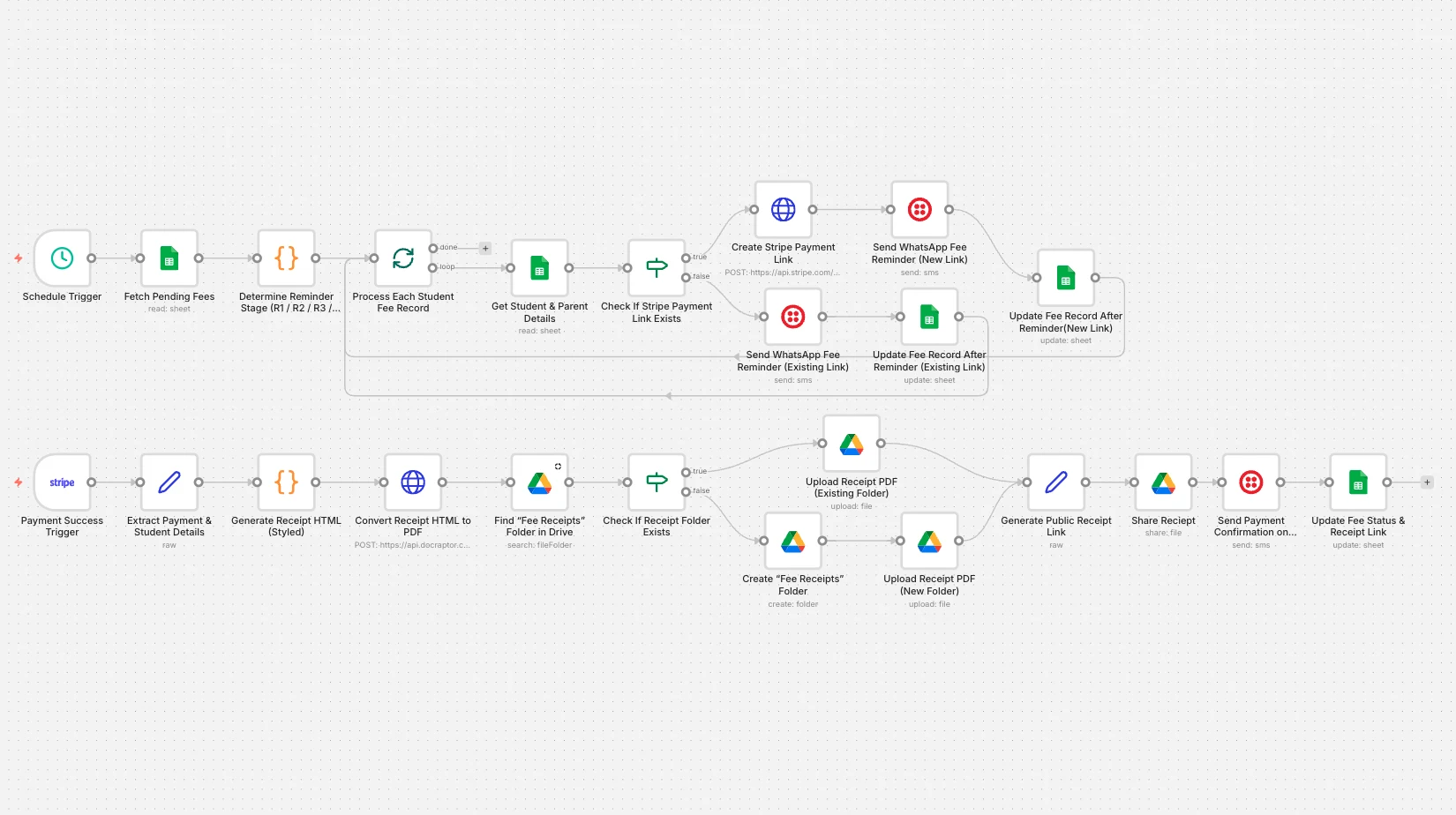
This workflow automates the entire student fee reminder, payment collection, and receipt generation process using n8n. Here’s how it works step by step:
1. Scheduled Fee Check
- The workflow runs automatically every day using a schedule trigger.
- It checks for pending student fees that require reminders.
2. Fetch Pending Fees from Google Sheets
- Connects to Google Sheets.
- Retrieves records where the fee status is marked as Pending.
- Ensures only unpaid fees are processed.
3. Determine Reminder Stage
- A code node calculates the number of days remaining until the due date.
- Based on the due date, the system sends reminders in stages:
- R1: First reminder (5 days before due date)
- R2: Second reminder
- R3: Final reminder before due date
- FINAL: Overdue reminder
4. Process Each Student Record
- Each fee record is processed individually.
- Prevents system overload when handling multiple students.
5. Generate Stripe Payment Link
- If a payment link does not already exist:
- A new Stripe payment link is created automatically.
- The link includes metadata such as:
- Student name
- Student ID
- Class
- Month
- Fee amount
6. Send WhatsApp Fee Reminder
- A WhatsApp reminder is sent to the parent using Twilio.
- The message includes:
- Student name
- Class
- Due amount
- Due date
- Secure Stripe payment link
7. Update Fee Reminder Status
- After sending the reminder, the workflow updates Google Sheets:
- Stores the Stripe payment link
- Updates LastReminderSent
- Records the reminder timestamp
- Prevents duplicate reminders.
8. Payment Success Trigger
- Stripe sends a webhook event when a payment is completed.
- The workflow captures the payment details automatically.
9. Generate Fee Receipt (HTML → PDF)
- A professional receipt is generated using HTML.
- The HTML file is converted into a PDF document using a PDF API.
- The receipt contains:
- Student name
- Class
- Month
- Payment ID
- Amount paid
10. Upload Receipt to Google Drive
- The workflow checks if a “Fee Receipts” folder exists.
- If not, it automatically creates one.
- The generated PDF receipt is uploaded to the folder.
11. Generate Public Receipt Link
- A shareable Google Drive link is created for the receipt.
- Access is set to view-only.
12. Send Payment Confirmation via WhatsApp
- Parents receive a WhatsApp confirmation message after payment.
- The message includes:
- Student details
- Payment amount
- Month
- Download link to the receipt PDF
13. Update Fee Payment Status
- Google Sheets is updated automatically:
- Status is changed to Paid
- Due amount is set to 0
- Receipt link is stored
- Payment timestamp is recorded
This workflow eliminates manual fee tracking and payment follow-ups. Schools can automate fee reminders, payment collection, and receipt generation seamlessly.
By combining this workflow with our n8n Workflow Automation Services, educational institutions can streamline their fee management process and reduce administrative workload.